Scene guide
Select a scene to see what to do.
1/3
Click arrows to view examples
Use this simulator to practise:
• Building a small office network
• Adding servers and a firewall for office security
• Experimenting freely (Open Lab)
• Designing an enterprise network with Wi-Fi demand
• Building a small office network
• Adding servers and a firewall for office security
• Experimenting freely (Open Lab)
• Designing an enterprise network with Wi-Fi demand
About this simulator
This tool is a teaching model, not a real network simulator.
• Device icons are not to scale – sizes help with placement and clarity only.
• Data flow, load, and congestion are simplified to make patterns visible.
• Numbers shown (load %, demand points, capacity) are approximate, not real-world measurements.
• The aim is to practise design decisions, not hardware specification.
Think in terms of: “Is this design sensible?” rather than “Is this technically exact?”
This tool is a teaching model, not a real network simulator.
• Device icons are not to scale – sizes help with placement and clarity only.
• Data flow, load, and congestion are simplified to make patterns visible.
• Numbers shown (load %, demand points, capacity) are approximate, not real-world measurements.
• The aim is to practise design decisions, not hardware specification.
Think in terms of: “Is this design sensible?” rather than “Is this technically exact?”
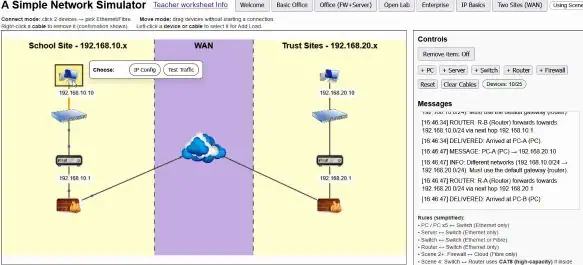
Controls
Devices: 0/15
Congestion: No
Select connection type:
Ethernet is used inside the office. Fibre is used for the internet/WAN link (not only Scene 2+).
Messages
Rules (simplified):
• PC / PC x5 ↔ Switch (Ethernet only)
• Server ↔ Switch (Ethernet only)
• Switch ↔ Switch (Ethernet or Fibre)
• Router ↔ Switch (Ethernet only)
• Scene 2+: Firewall ↔ Cloud (Fibre only)
• Scene 4: Switch ↔ Router uses CAT8 (high-capacity) if inside the Server Room (otherwise Ethernet)
• Scene 4: WAP ↔ Switch (Ethernet only)
• Scene 6: Router ↔ Firewall uses Ethernet; Firewall ↔ Cloud uses Fibre; routers do not connect directly
• No direct PC↔PC, PC↔Server, Router↔PC/Server
• PC / PC x5 ↔ Switch (Ethernet only)
• Server ↔ Switch (Ethernet only)
• Switch ↔ Switch (Ethernet or Fibre)
• Router ↔ Switch (Ethernet only)
• Scene 2+: Firewall ↔ Cloud (Fibre only)
• Scene 4: Switch ↔ Router uses CAT8 (high-capacity) if inside the Server Room (otherwise Ethernet)
• Scene 4: WAP ↔ Switch (Ethernet only)
• Scene 6: Router ↔ Firewall uses Ethernet; Firewall ↔ Cloud uses Fibre; routers do not connect directly
• No direct PC↔PC, PC↔Server, Router↔PC/Server